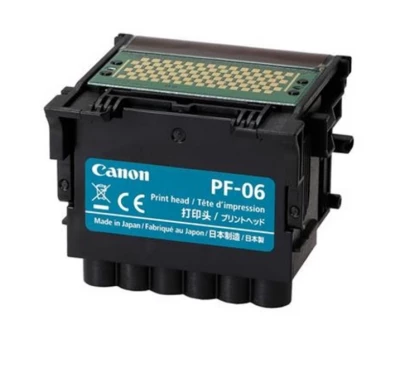
The Canon PF-06 is a genuine replacement printhead for the Canon imagePROGRAF TM-300 and TM-350. It works with the printers' pigment ink systems to produce technical drawings, posters and large-format graphics.
Designed as a user-replaceable component, the PF-06 is installed using the printer's guided maintenance procedure. Check your printer model before ordering and follow Canon's instructions for replacement and printhead adjustment.
SKU: Canon_acc_0001
Stock: 0
Delivery time:
The Canon PF-06 printhead is a genuine Canon replacement part for the imagePROGRAF TM-300 and TM-350. It is the component that deposits ink onto the paper, forming the fine lines, text and colour areas used in technical drawings, posters and other large-format graphics.
Both printers use Canon Bubble Jet inkjet technology with pigment inks. The PF-06 belongs to this printing system and should not be confused with a thermal printhead for receipt or shipping-label printers.
This listing covers the following models:
Check the complete model name on your printer before purchasing. If you need a printhead for another Canon machine, contact us to confirm compatibility rather than assuming that all imagePROGRAF printers use the same part.
A correctly functioning printhead is important for reproducing fine details and consistent colour. In compatible TM-series printers, the PF-06 supports applications such as CAD drawings, architectural plans, presentation graphics and posters.
Replacing a faulty or worn printhead can help restore print quality when the printhead is the cause of the problem. The final result also depends on the condition of the printer, the ink and paper used, and the selected print settings.
Canon advises replacing the printhead when the printer's touchscreen requests it or when a Canon dealer recommends replacement. Missing lines, banding or uneven colour do not automatically mean that a new printhead is required, so follow the troubleshooting guidance for your model before ordering.
If you are unsure, note the message or error code displayed on the printer. This information can help identify whether you need a replacement part or further maintenance advice.
The PF-06 is user-replaceable, but installation must follow the correct maintenance sequence. Start the printhead replacement function from the printer's maintenance menu and follow the touchscreen instructions and Canon's manual for your model.
Allow time for the printer to fill the new printhead with ink and complete its setup. These points are a preparation checklist, not a substitute for the full replacement instructions.
| Manufacturer | Canon |
|---|---|
| Printhead model | PF-06 |
| Product type | Genuine replacement inkjet printhead |
| Compatible models covered by this listing | Canon imagePROGRAF TM-300 and TM-350 |
| Printing technology | Canon Bubble Jet thermal inkjet |
| Replacement method | User-replaceable through the printer's maintenance procedure |
| Product code | Canon_acc_0001 |
Browse our Canon ink and Canon paper and accessories for related supplies. Always choose consumables that match your exact printer model.
If you need help checking compatibility or choosing a replacement printhead, contact us on +44 2036300130 or email [email protected]. Please include your printer model and any displayed error message so we can guide you more effectively.